


Website pagination plays a critical role in user experience and search engine performance, especially for large catalogs, blogs, and content-heavy sites. When implemented correctly, pagination helps search engines crawl your pages efficiently, prevents duplicate content issues, and ensures users can navigate your site without friction. But when done poorly, pagination can lead to wasted crawl budget, thin content, and rankings loss.
This guide covers the most effective Pagination SEO best practices to keep your website clean, indexable, and optimized for both users and search engines.
What Is Pagination in SEO?
Pagination is the process of splitting long lists of content—such as product categories, blog archives, or search results—into multiple pages.
Examples include:
/blog?page=2/category/shoes?page=3/products?page=4
While pagination improves usability, it also creates unique challenges for SEO because search engines must understand:
- which pages to index
- how pages relate to one another
- which version (if any) is canonical
Why Pagination Matters for SEO
Incorrect pagination can lead to:
- duplicate content
- wasted crawl budget
- weak internal linking
- diluted authority
- poor user experience
Proper pagination structure helps:
- distribute link equity
- improve crawl efficiency
- maintain rankings
- keep users engaged longer
Best Practices for Pagination SEO
1. Keep Page 1 as the Most Important URL
Page 1 of any paginated series is almost always the most valuable page for SEO.
Make sure:
- it targets the primary keyword
- it has the most backlinks
- it loads fast
- it contains optimized content
Avoid canonicalizing page 2+ back to page 1 unless your content is nearly identical (more on canonicalization below).
2. Use Clean, Consistent URL Structures
Good pagination URLs:
/category/shoes?page=2
/category/shoes?page=3
Avoid:
- dynamic parameters like
?id=243&session=09&page=2 - hash URLs (
#/page/2) - changing URL patterns
Search engines prefer clear, predictable structures.
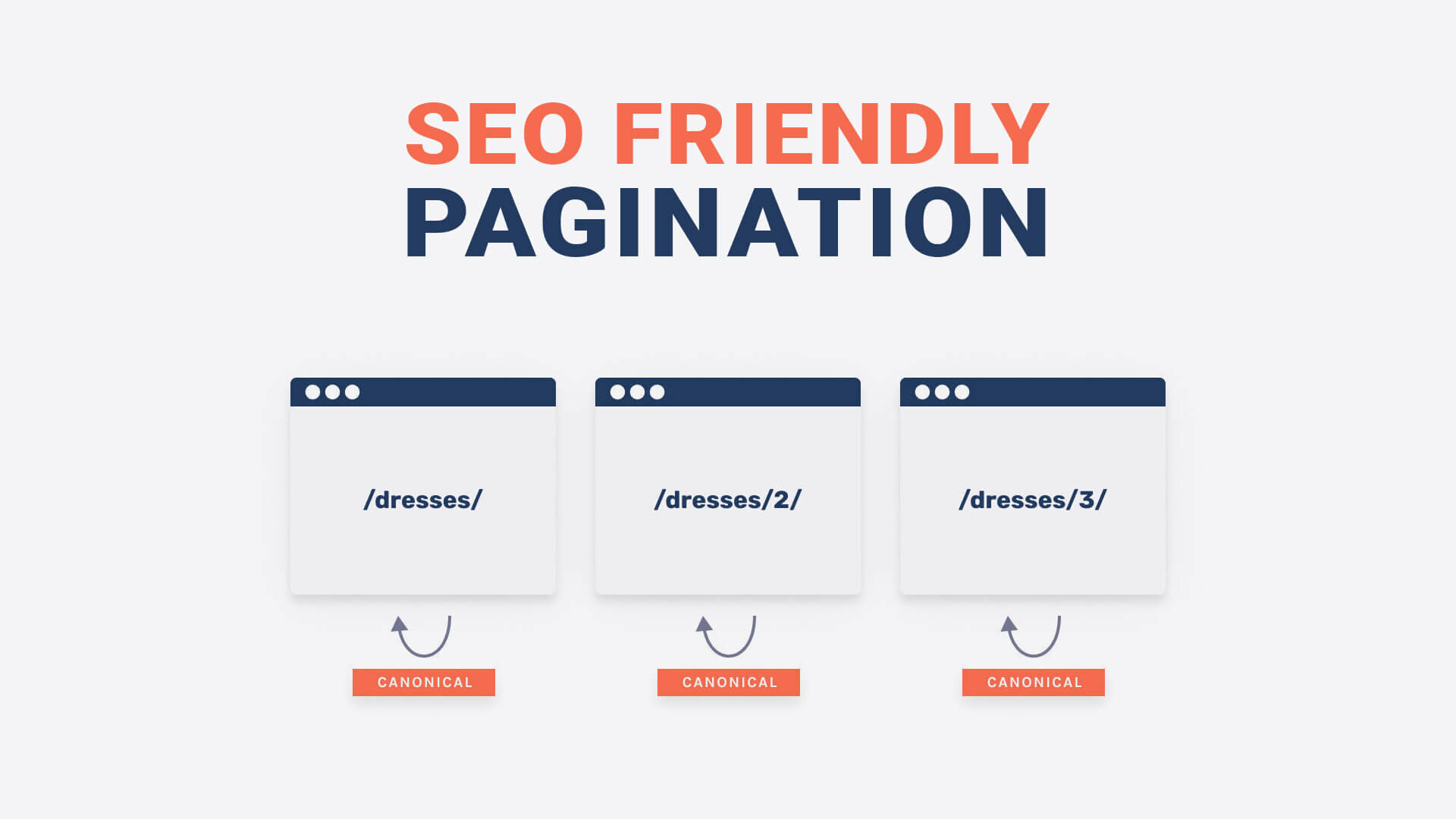
3. Use a Self-Referencing Canonical Tag on Each Paginated Page
Each page in the series should canonicalize to itself, not page 1.
Example for page 3:
<link rel="canonical" href="https://example.com/category/shoes?page=3" />
Why?
- It prevents deindexing deeper pages
- It tells Google each page contains unique, crawlable content
4. Provide Strong Internal Linking to Deeper Pages
Pagination often hides deeper pages from search engines.
You can fix this by adding:
- “Load more” buttons that also link to numbered pages
- category filters
- breadcrumbs
- “Next” and “Previous” links
This improves crawl depth and supports indexation.
5. Avoid Using Noindex on Pagination Pages
Noindexing paginated content often:
- cuts off internal link flow
- reduces crawlability
- hides useful content
Instead, keep all paginated pages indexable unless they contain thin or duplicate content.
6. Ensure Fast Page Loading Across All Pagination Levels
Large category pages are often slow, especially on ecommerce websites.
Optimize:
- image compression
- lazy loading
- server response time
- caching
- JavaScript execution
Faster pages = better crawlability + improved rankings.
7. Use “Load More” or Infinite Scroll With Crawlable Links
Infinite scroll alone is bad for SEO unless properly implemented.
Solution:
- Pair infinite scroll with crawlable pagination URLs
- Provide numbered pages in HTML
- Ensure Google can reach all items without scrolling
Google must be able to crawl content without user interaction.
8. Keep Page Title and H1 Tags Unique
Example structure:
Page Title:
Shoes Collection | Page 2 | Brand Name
H1:
Shoes – Page 2
This reduces the risk of duplicate content and improves clarity.
9. Improve User Experience on Paginated Pages
User behavior affects SEO signals such as:
- bounce rate
- dwell time
- click depth
Best UX tips:
- large page numbers
- easy Next/Previous buttons
- clear category filters
- consistent layout
Better UX → better engagement → improved rankings.
10. Don’t Rely on rel=”next” and rel=”prev” Tags
Google announced that it no longer uses rel="next" and rel="prev" for indexing.
However, they still help usability, so you may use them — just not as your primary SEO strategy.
Conclusion
Pagination SEO is essential for websites with large catalogs or long content lists. By using self-referencing canonicals, clean URL structures, indexable pages, and strong internal linking, you ensure search engines can properly crawl and understand your content — while also keeping your users engaged.
Implementing these best practices will help you avoid duplicate content issues, reduce crawl waste, and strengthen your site’s overall SEO performance.